Block /Allow incoming email from certain addresses

  • October 30, 2009
  • 12 replies
  • 343 views

Hi I have searched the forum but could not find an answer to this.... I wish to allow a support call to be created from only selected (around 2) email addresses. I am sick of lazy users just sending an email meaning we have to set the categories etc... ourselves instead of logging a call correctly. I cannot block totally though this as certain people (CEO, Owner etc...) are allowed to be lazy 😉 Can I do this? I would also like an auto reply to let them know a support call has NOT been created if poss. Cheers

12 replies

techguy
Active talker
Forum|alt.badge.img+1
  • Active talker
  • October 30, 2009
first follow the advice mentioned here /Sysforums/posts/list/1278.page to stop users setting up the requests by email Then add a second email integration account to sysaid and only reveal the new email address to those lazy people (cough: I mean Highly important beings at the top).

Obelix
Active talker
  • Active talker
  • October 30, 2009
On SysAid no. But you can put rules on the incoming mailbox. If you're using outlook-exchange take a closer look at "Rules and alerts" under "Tools" menu in outlook.

  • Author
  • New SysMate
  • October 30, 2009
I am ideally looking at using the existing email integration address. As I said, people at the top are extremely lazy and will either complain that I changed the address or forget and still email the old address before complaining about it. I also don't trust them not to tell anyone else about the new address. The email integration address is from an exchange account but I can't use rules in Outlook as that would require the user account to be logged in permanently. Is there not a way to set a sysaid rule up that allows from specified addresses and rejects from any other with an auto reply? Hopeful 😁

Forum|alt.badge.img
  • Active talker
  • October 30, 2009
liam888, At the moment, you can only block emails with certain phrases in the subject, but not per email address. If you want, you can open a feature request for this in the feature request forum at: /Sysforums/forums/show/101.page so it can be considered for future releases. Regards. Haim

  • Author
  • New SysMate
  • October 30, 2009
Ok, will do thanks Haim 8)

Forum|alt.badge.img
  • Community Enthusiast
  • May 24, 2021
Has this feature been added? I need to block a specific user who is spamming our helpdesk email box. Thanks, Heidi

Maayan Karstaedt
SysAider
Forum|alt.badge.img

Hi all, 

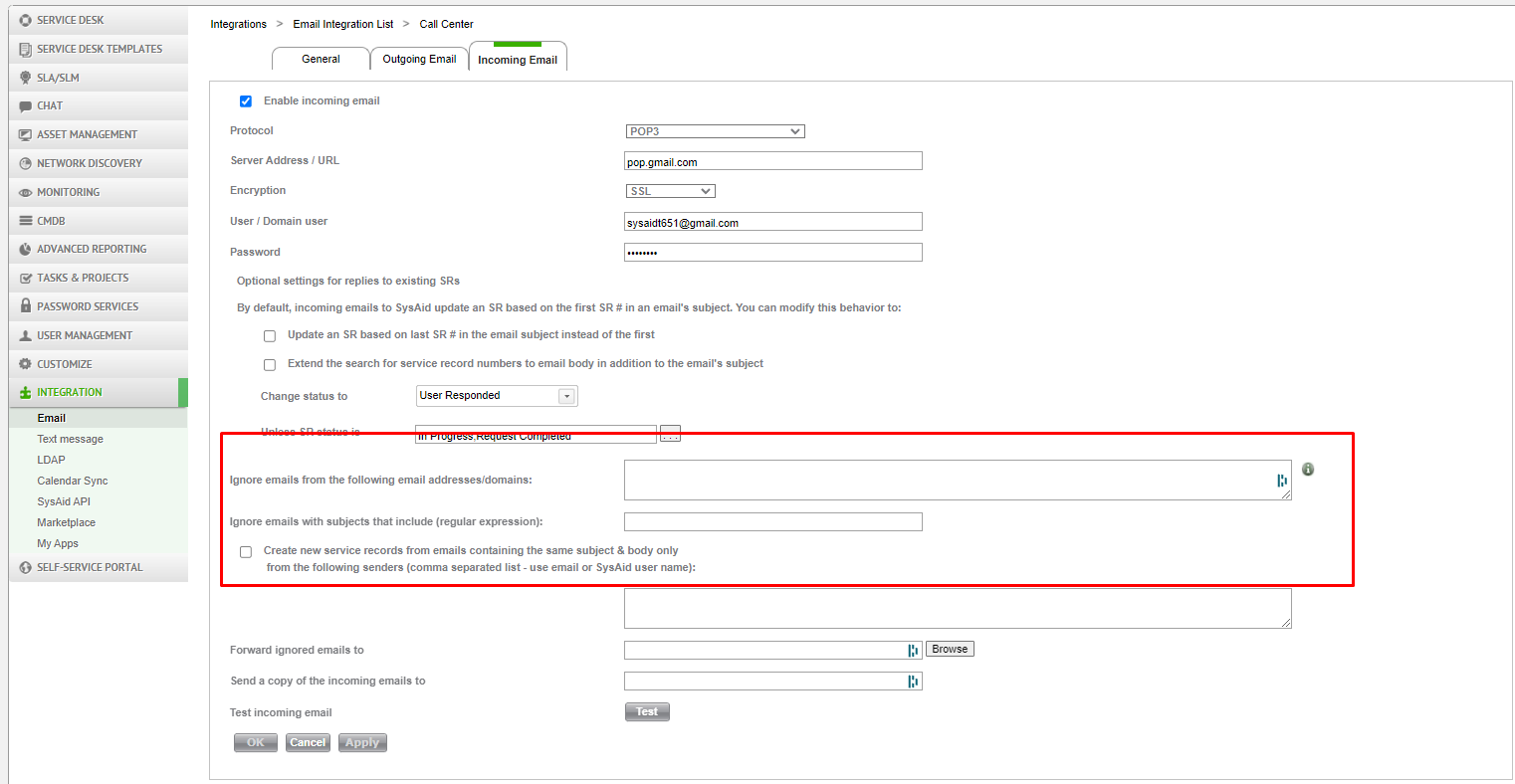
Yes you can blacklist specific emails or domains, learn more here. 

Cheers,

Maayan


  • New SysMate
  • July 11, 2023

Is there a setting to whitelist only certain emails? I have users not within our organization that may need to submit tickets.


  • July 12, 2023

Hey @Brian 👋
Theoretically, anyone can submit a ticket via email by sending it to the mailbox. Does it answer your question or you have a more specific case? There’s an option to allow submitting tickets via Guest mode via SSP (but that’ll allow anyone to submit the ticket). The Guest mode can be enabled in Settings → Self service portal → General settings → ✅ Enable access without login (Guest mode)


  • New SysMate
  • July 12, 2023

The case: we have a user that has a domain user with us, is able to submit tickets through the user portal. But in the case she is having issues an is unable to submit a ticket through the portal she can email the help desk with the help desk email (this is setup and working). I was looking for a setting to only allow certain emails to be able to create tickets by emailing the help desk. And essentially block all other (gmail, yahoo, etc.) other than certain ones that are allowed. 

i.e. block: @gmail.com
     allow: randomsomething@gmail.com

be able to whitelist only certain email addresses to email the help desk and create tickets.


  • July 12, 2023

I’ll check it and we’ll get back to you


alin.lupascu
SysAider
Forum|alt.badge.img+1

Hi @Brian ,


Sysaid offers the possibility to Block certain domains or email addresses. You can check this option by Navigating to Settings → Integration → Email → Select the email that you are using and navigate to “Incoming Email” Tab. 


Alternatively you can allow certain email addresses from O365 (this will be the easier solution and the one that I personally recommend) 


Here is an easy guide on how to achieve it for O365 - https://office365atwork.com/exchange/whitelist-domain-in-office-365/